Purpose-built for MROs and AMOs
One system for your whole MRO or AMO.
AltusMRO brings your SMS, LMS and QMS together with GSE tracking, fleet planning, AD compliance, document control and publication management. One solution, built from the ground up for aviation MROs and AMOs.
SMSSafety managementHazard reports, corrective actions, management of change and the H&S committee.
LMSTrainingOnline and offline training, qualifications and due dates for every person.
QMSQualityAudits, checklists, policy manuals, management review and the audit packet.
GSEEquipment trackingGround support and shop equipment, with inspection and calibration schedules.
FleetFleet planningAircraft records, a shop calendar and a Gantt view of upcoming work.
ADAD complianceFAA directives kept current and attached to each aircraft.
DocsDocument controlPolicy manuals, safety policy and emergency plan, with revisions kept.
PubsPublication managementControlled manuals and revisions, and who has read what is current.
01 / Together
Connected, not bolted together
Separate tools mean separate logins, separate lists and records that never meet. In AltusMRO the pieces share one set of people, aircraft and documents.
Shared 01
One task list
Everything assigned to you across the app, soonest due first, so nobody has to check five places.
- Hazard actions
- Corrective actions
- Training assignments
Shared 02
One calendar
Shop projects, aircraft maintenance due, equipment maintenance and shelf-life checks sit on one calendar and one Gantt view.
- Projects
- Aircraft due
- Equipment
- Shelf-life
Shared 03
One search
Find a publication, a hazard, a corrective action, a safety data sheet, a checklist, a tool or a training module from one box.
- Publications
- Hazards and CARs
- SDS
- Checklists
- Equipment
- Training
Shared 04
One set of people
Roles, qualifications, personal documents and training status live on the employee record, and the same accounts decide who sees and signs what.
- Roles
- Qualifications
- Personal documents
- ACA sign-off
02 / Product
See it working
The screens your people use every day. Every image here is AltusMRO itself.
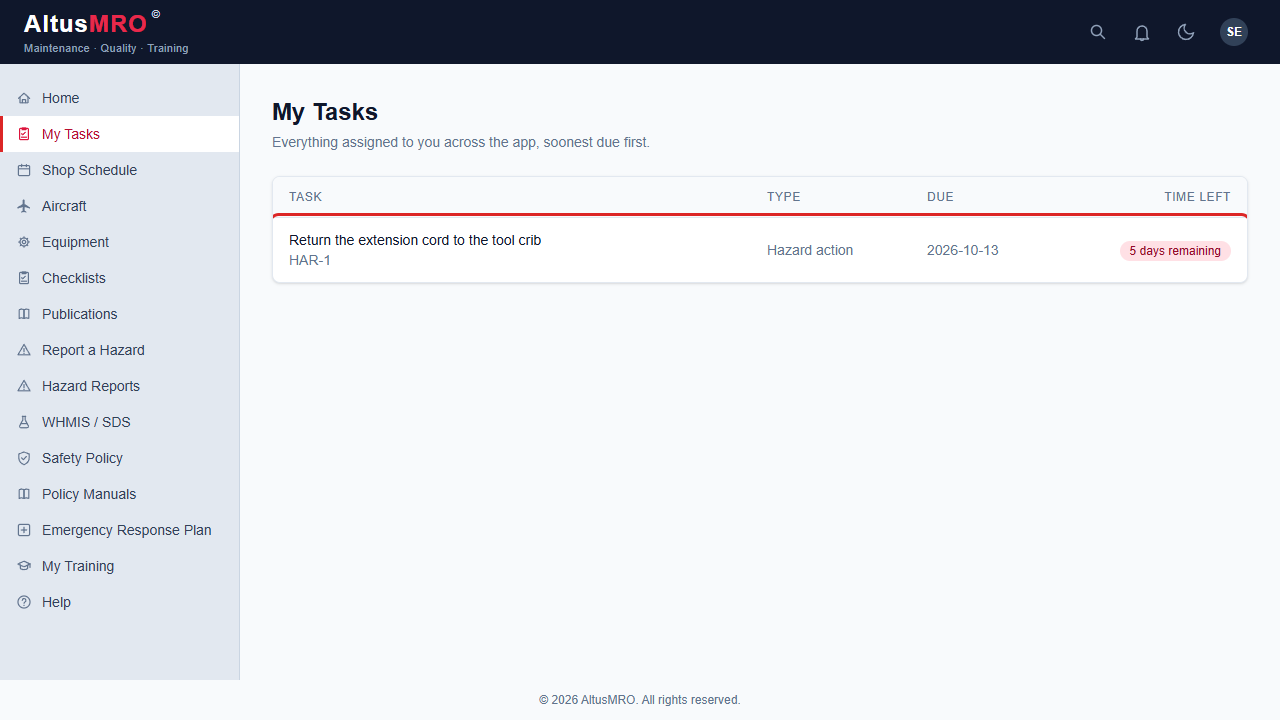
Hazard actionDue soon
Everything assigned to you across the app, in one list, soonest due first.
- Hazard actions, corrective actions and training in one place
- Time remaining shown on every item
- Nothing to chase: if it is yours, it is on your list
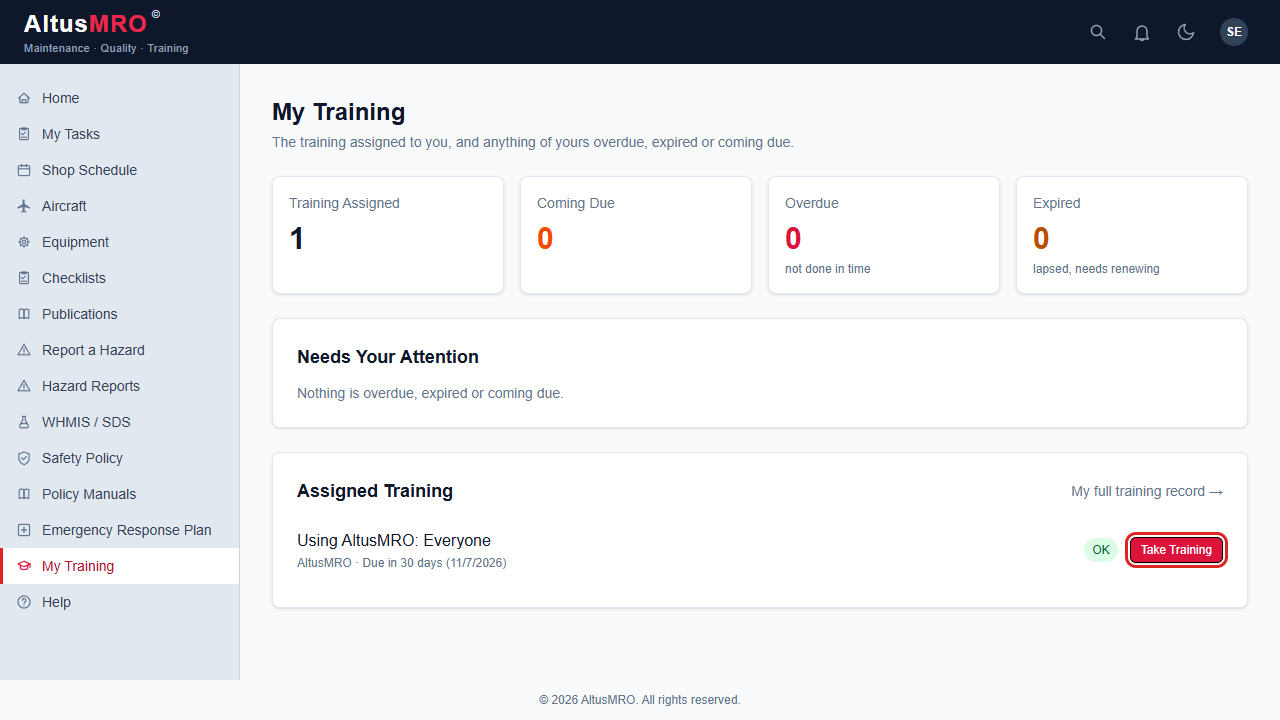
CurrentComing dueOverdue
Each person sees their own assigned training, what is coming due and what has lapsed. Training managers see the whole shop.
- Online courses (SCORM) delivered and recorded in the system
- Offline training, qualifications and personal documents on the same record
- Due and overdue reminders, with retraining that follows your own lapse rules
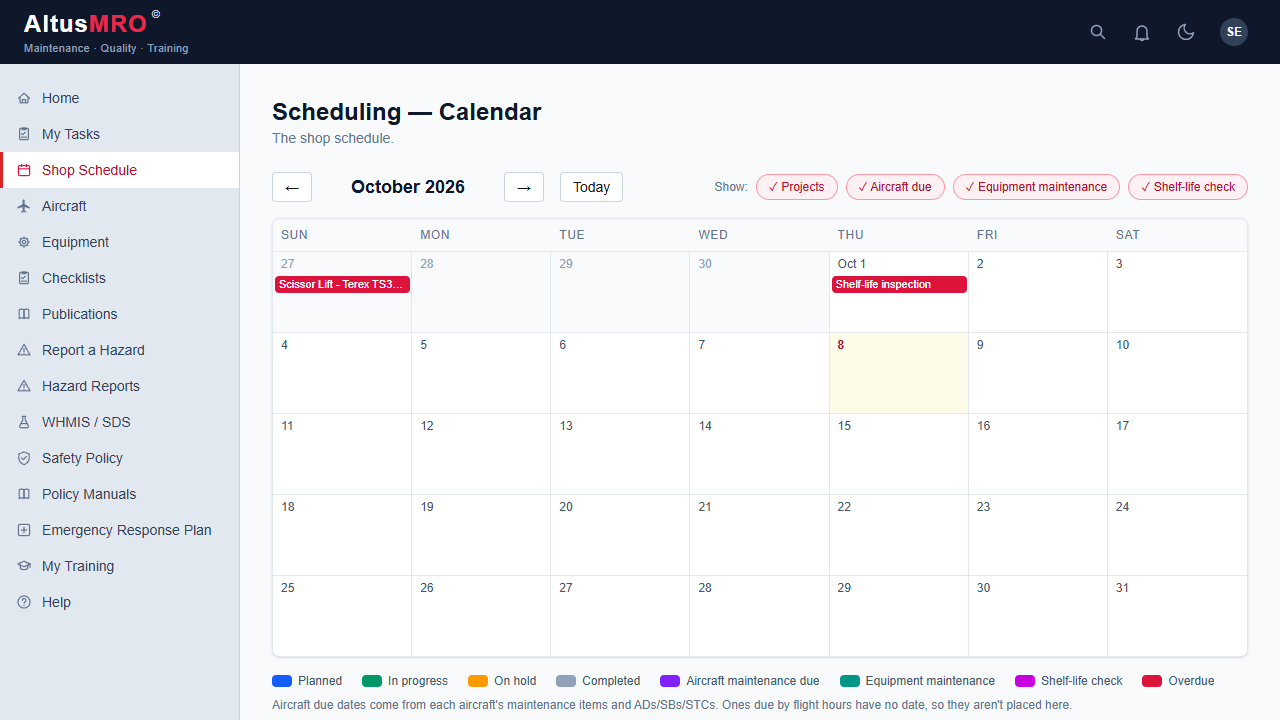
PlannedIn progressOverdue
Shop projects, aircraft maintenance due, equipment maintenance and shelf-life checks on one calendar, colour-coded by type and status.
- Switch each kind of work on or off to see what you need
- Gantt view for projects that run over weeks
- Overdue items stand out before they become findings
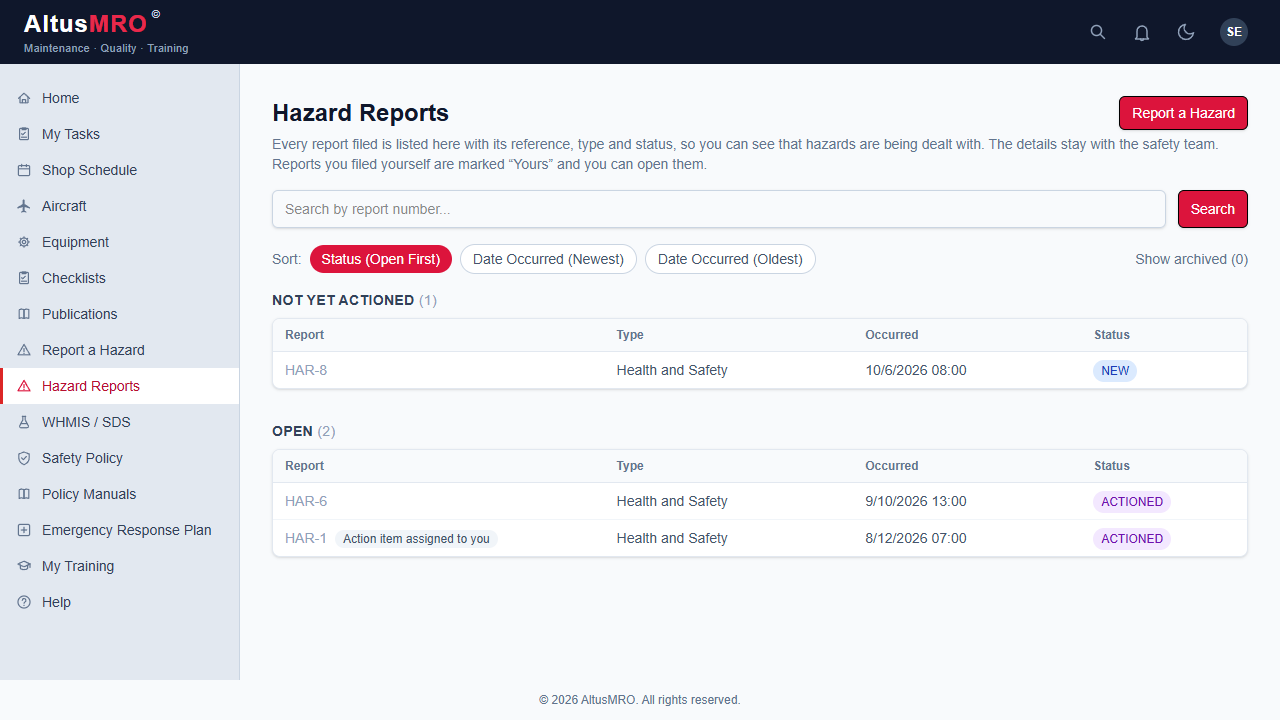
NewActionedClosed
Anyone can report a hazard in a minute. Managers assess it, assign actions and follow each one through to closure, with the history kept.
- Every report gets a reference number and a visible status
- Action items land on the right person's task list with a due date
- Corrective actions, management of change and the H&S committee in the same place
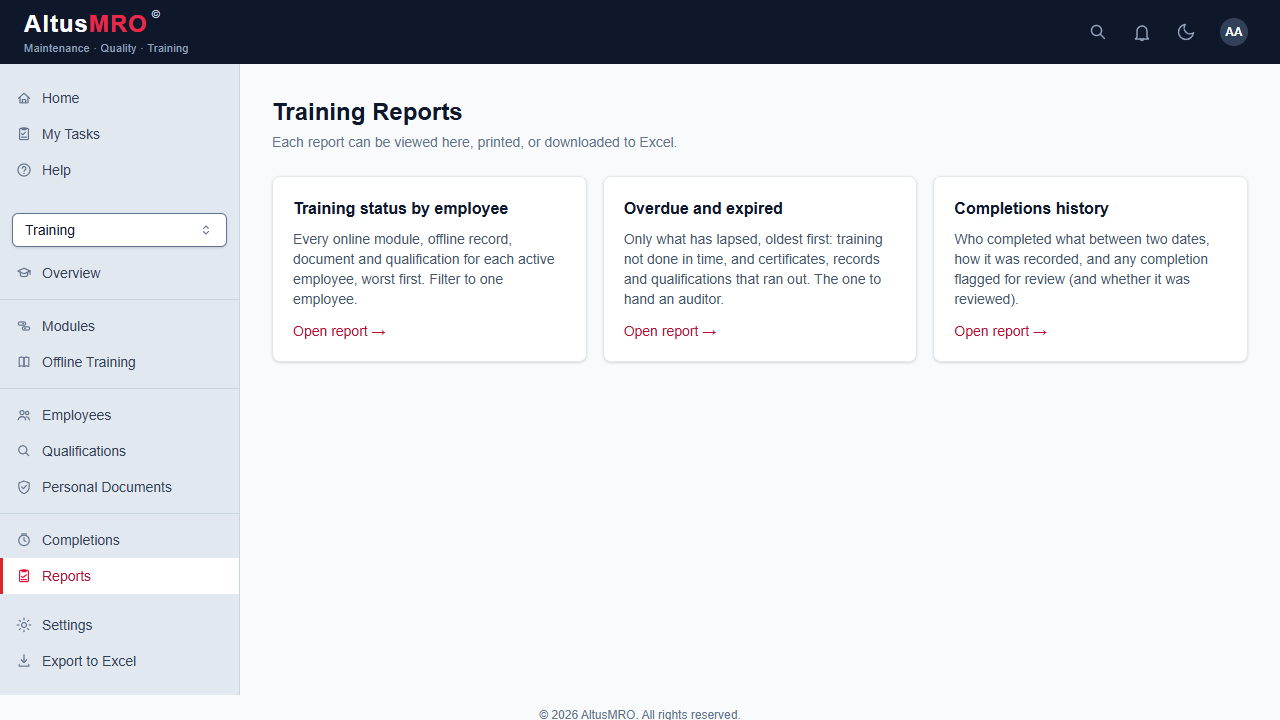
Overdue and expiredCompletions
Training status, overdue and expired, completions history and more. View them on screen, print them, or download to Excel.
- Worst-first lists, so the gaps are at the top
- Filter to one employee, one module or a date range
- Excel export for the people who live in spreadsheets
EveryoneMy tasks
Real AltusMRO screens, demo data1 / 5
Modules16Switch off what you do not use
Access4 + 4Four levels, four tick boxes
Shared1 searchOne calendar, one task list
Runs inAny browserDesk, laptop or shop tablet
03 / Index
Sixteen modules, one index
Each works on its own and shares the same people, records and search. Switch off the ones you do not need.
3.01
Hazard reportingSMS
Quick reports from anyone, assessed and tracked through to closure.
3.02
Corrective actionsSMS
Root cause, action, owner, due date and effectiveness check in one trail.
3.03
Management of changeSMS
Plan, assess and approve changes before they reach the floor.
3.04
H&S committeeSMS
Health and safety hazards, meetings and follow-up for the committee.
3.05
WHMIS / SDSSMS
Safety data sheets in one searchable library.
3.06
Training and LMSLMS
Online modules, offline records, qualifications, due dates and completions.
3.07
AuditsQMS
Audit program, internal audits, findings, management review and the audit packet.
3.08
ChecklistsQMS
Shop and audit checklists with sign-off, revisions and export.
3.09
EquipmentGSE
Ground support and shop equipment with inspection and calibration schedules.
3.10
Shelf-lifeGSE
Track consumables and expiry so nothing out of date gets used.
3.11
AircraftFleet
Airframe, engine, propeller and component records, with directives, service bulletins and STCs.
3.12
SchedulingFleet
Shop projects on a calendar and Gantt chart, with aircraft and equipment due dates alongside.
3.13
AD searchAD
Search the FAA directive database, kept current automatically, and attach directives to aircraft.
3.14
Policy manualsDocs
Company documents by category, with the safety policy and emergency response plan.
3.15
PublicationsPubs
Controlled manuals and revisions, with a clear record of what is current.
3.16
Search and remindersAll
Find anything from one search box, and get email reminders for what is yours.
Built for the people who sign their name to the work.

04 / Access
The right view for each person
Every account has a level, plus optional extras. Menus follow it, and the rules are enforced on every page, not just hidden.
Level 1
Technician
Views the shop and aircraft, reports hazards, takes training and fills out checklists marked for technicians.
Level 2
Supervisor
Runs the shop floor: aircraft and directives, shop projects and publications.
Level 3
Manager
Hazards, management of change, management review, company documents and equipment.
Level 4
QA / Admin
Full access, including risk ratings, closing records, audits and accounts.
Plus tick boxesACA sign-offH&S committeeAuditorTraining manager
05 / Audit
When the auditor walks in, you are not scrambling
The records are made as the work happens, so proving it later is a search and a print, not a project.
01
Plan
Set up the audit program and internal audits against your approvals.
02
Check
Fill and sign audit checklists, record findings with evidence.
03
Correct
Raise corrective actions with an owner and due date, and follow them to closure.
04
Prove
Pull the audit packet, reports and change history, to screen, print or Excel.
06 / FAQ
Questions
Q.01What do SMS, LMS, QMS and GSE mean here?
SMS is safety management: hazard reports, corrective actions, management of change and the H&S committee. LMS is training and qualifications. QMS is audits, checklists and quality records. GSE is ground support and shop equipment with its inspection and calibration schedules.
Q.02How is this different from using separate tools?
Most tools cover one piece, so people, aircraft and records get entered several times and never connect. AltusMRO is built for aviation MROs and AMOs, so fleet, directives, equipment, shelf-life, publications, training, safety and audits share one record.
Q.03Where is AltusMRO based?
AltusMRO is a Canadian company based in Vancouver, British Columbia.
Q.04Who is AltusMRO for?
Aviation MROs and AMOs that need to run quality, safety and training records properly, from large shops to small repair stations, including those working under CAR 573. Smaller operations can switch off the modules they do not use.
Q.05What is the difference between an MRO and an AMO?
An MRO is any business that maintains, repairs or overhauls aircraft or aircraft components. An AMO is an approved maintenance organization, the term used for a shop approved to maintain aircraft under rules such as CAR 573. Many businesses are both. AltusMRO is built for either.
Q.06Does it replace our manuals and procedures?
No. It holds them, controls their revisions and shows who has what. Your approved procedures stay yours.
Q.07Where is our data kept?
Each organization gets its own separate system and database. It can run as a cloud service we host or on a server you own. Ask us which fits your situation.
Q.08Can we bring in our existing records?
Yes. Employee, training, equipment and document records can be loaded in, so you do not start from a blank page.
Q.09Do my staff need training to use it?
It includes a Help library and short in-app training modules for every role, delivered through the same training system.
Q.10I already have an account. Where do I log in?
Use the Log in button at the top of this page. If your organization runs AltusMRO on its own server, use the address your administrator gave you.
Get in touch
Ready to see AltusMRO in your organization?
Tell us a little about your shop and we will show you how it fits. We are a Canadian company based in Vancouver, BC. Already a customer? Sign in below.